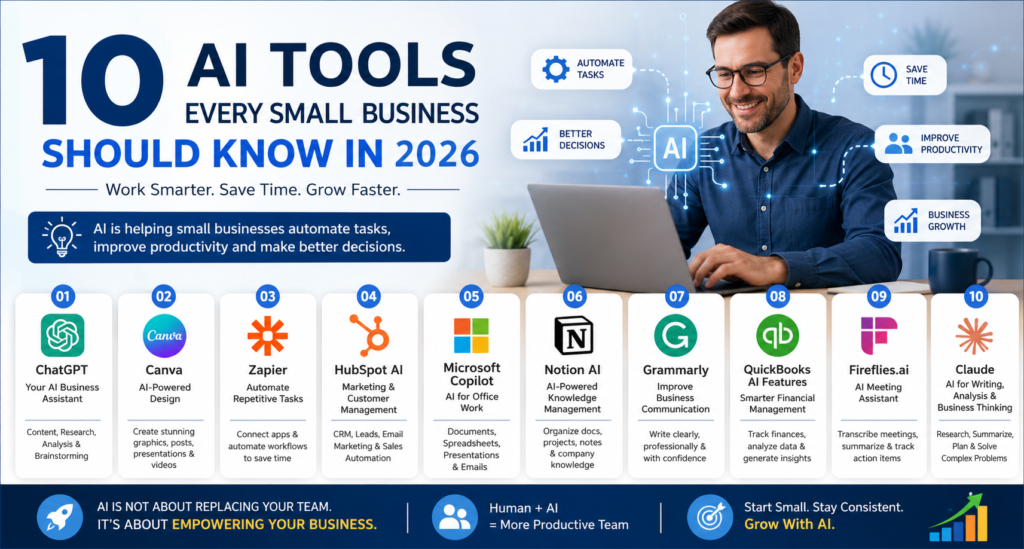
10 AI Tools Every Small Business Should Know in 2026
Artificial Intelligence is no longer a technology reserved for large corporations with huge IT budgets. In 2026, small businesses can use AI to create marketing content, respond to customers, analyze data, automate repetitive tasks, improve productivity, and make better business decisions.
For a small business owner, the biggest benefit of AI is not simply “doing things faster.” The real opportunity is to do more with a small team while maintaining quality and consistency.
The AI market is growing rapidly, with new tools appearing every month. However, businesses don’t need dozens of AI subscriptions. The goal should be to select a small number of tools that solve real business problems.
Here are 10 AI tools every small business should know about in 2026.
1. ChatGPT – Your AI Business Assistant
ChatGPT has become one of the most versatile AI tools for businesses. It can support activities ranging from content creation and research to data analysis, brainstorming, customer communication, and business planning.
OpenAI describes its business offering as a platform for writing, research, analysis, marketing, sales, operations, and other everyday business workflows.
How small businesses can use ChatGPT
A business owner can use ChatGPT to:
- Write website content
- Create blog articles
- Prepare social media posts
- Generate email drafts
- Create product descriptions
- Develop marketing ideas
- Analyze spreadsheets and business data
- Prepare proposals
- Create meeting summaries
- Develop customer-service responses
- Brainstorm new products and services
- Create training materials
- Generate website and programming assistance
For teams, ChatGPT Business provides a shared workspace with administrative controls and business-oriented features. OpenAI also states that business data is not used for model training by default.
Best for
Content creation, research, productivity, business analysis, customer communication and brainstorming.
2. Canva – AI-Powered Design for Marketing
Professional graphic design can be expensive and time-consuming for a small business.
Canva helps businesses create social media graphics, presentations, advertisements, brochures, posters, business documents, videos and other marketing materials.
Its AI-powered Magic Studio is designed to help people create and adapt content without requiring advanced design skills. Canva also provides AI features specifically aimed at small and medium-sized businesses.
How small businesses can use Canva AI
You can use Canva to create:
- Instagram and Facebook posts
- LinkedIn graphics
- YouTube thumbnails
- Promotional banners
- Business presentations
- Flyers
- Posters
- Product advertisements
- Brochures
- Short marketing videos
- Branded templates
The major advantage is speed and consistency. Instead of starting every design from scratch, businesses can maintain brand assets and create variations for different campaigns.
Example
A local restaurant could create:
One promotion → social media post → WhatsApp graphic → Instagram story → poster → digital advertisement
without designing each asset completely from scratch.
Best for
Graphic design, social media marketing, advertisements and brand content.
3. Zapier – Automate Repetitive Business Tasks
Many small businesses lose valuable time performing repetitive administrative tasks.
Zapier helps connect different applications and automate workflows. Its current platform supports thousands of apps and includes AI-powered workflow features.
Example workflow
Imagine that someone submits a contact form on your website.
Instead of manually processing the lead, an automated workflow could:
Website Form → CRM → Email Notification → Spreadsheet → Follow-up Task
AI can also be incorporated into workflows for tasks such as summarizing, classifying and drafting information.
Small-business automation examples
- New lead → CRM
- New order → notification
- New customer → welcome email
- Website enquiry → sales team notification
- Form submission → spreadsheet
- Customer feedback → AI classification
- New appointment → calendar update
Best for
Automation, lead management, administrative workflows and productivity.
4. HubSpot AI – Marketing and Customer Managemen
Customer relationships are critical for small businesses.
HubSpot combines CRM, marketing, sales and customer-service capabilities, while its AI features can help businesses with content, customer interactions, research and other workflows.
A CRM combined with AI can help a small business organize customer information rather than keeping leads scattered across spreadsheets, email accounts and messaging applications.
Possible applications
- Lead management
- Customer segmentation
- Email marketing
- Sales follow-ups
- Marketing content
- Customer support
- Sales reporting
- Pipeline management
- Customer relationship analysis
Example
A business receives 100 enquiries in a month.
Instead of manually checking every enquiry, a structured CRM process can categorize leads into:
New Lead → Qualified Lead → Proposal Sent → Follow-up → Won/Lost
AI can then assist employees with repetitive communication and analysis.
Best for
CRM, sales, marketing automation and customer management.
5. Microsoft Copilot – AI for Office Work
Many small businesses already depend on Microsoft applications such as Word, Excel, PowerPoint, Outlook and Teams.
Microsoft Copilot brings AI assistance into the Microsoft ecosystem, making it useful for organizations already using Microsoft 365.
Small-business use cases
Copilot can assist with:
- Drafting documents
- Summarizing information
- Preparing presentations
- Working with spreadsheets
- Email assistance
- Meeting-related tasks
- Business analysis
- Research and productivity
For businesses that already use Microsoft products extensively, an integrated AI assistant can reduce the need to move information between multiple applications.
Best for
Office productivity, documents, spreadsheets, presentations and workplace collaboration.
6. Notion AI – AI-Powered Knowledge Management
Small businesses often have a hidden problem: information is everywhere.
Company procedures may be stored in documents, employee notes, Google Drive folders, emails and messaging applications.
Notion provides a workspace for organizing information, projects, documents and knowledge, with AI capabilities that can assist with writing, summarization and information discovery.
How businesses can use it
Create a central knowledge base containing:
- Company policies
- Employee procedures
- Project information
- Meeting notes
- Marketing plans
- Product information
- FAQs
- Standard operating procedures
- Business goals
AI can then help employees find and work with information more efficiently.
Best for
Documentation, knowledge management, project management and team collaboration.
7. Grammarly – Improve Business Communication
Professional communication matters.
A poorly written email, proposal or website page can make a business appear less professional.
Grammarly uses AI-assisted writing features to help users improve grammar, clarity, tone and overall communication.
Small-business applications
Use it for:
- Emails
- Website content
- Blog posts
- Proposals
- Customer messages
- Social media posts
- Business documents
- Internal communication
Example
Instead of simply checking whether a sentence is grammatically correct, AI-assisted writing tools can help make communication:
Clearer + More Professional + More Concise + Appropriate for the Audience
Best for
Business writing, proofreading and professional communication.
8. QuickBooks AI Features – Smarter Financial Management
Financial management is one of the most important areas for a small business.
Accounting software with AI capabilities can help businesses understand financial information, automate certain tasks and identify useful insights.
For example, AI-assisted financial workflows can help business owners move from simply looking at numbers to asking:
- What are my biggest expenses?
- Which products are generating the most revenue?
- How has revenue changed?
- Where are costs increasing?
- Which invoices require attention?
- What should I investigate further?
OpenAI is also highlighting integrations involving QuickBooks and ChatGPT for financial decision-making.
Important reminder
AI should support financial decision-making, not replace professional accounting or tax advice when expert judgment is required.
Best for
Accounting workflows, financial analysis and business reporting.
9. Fireflies.ai – AI Meeting Assistant
Meetings consume a significant amount of time.
The problem becomes even bigger when employees have to remember what was discussed and manually prepare notes afterward.
AI meeting assistants such as Fireflies.ai can help with meeting transcription, summaries, action items and searchable conversation records.
Small-business applications
After a sales meeting, an AI meeting assistant can help produce:
Meeting → Transcript → Summary → Action Items → Follow-up
This can reduce the administrative work associated with meetings.
Example
Instead of spending 30 minutes after every meeting writing notes, employees can spend that time following up with customers or completing important tasks.
Best for
Meetings, sales calls, interviews, notes and action-item tracking.
10. Claude – AI for Writing, Analysis and Business Thinking
Claude is another major AI assistant that can be useful for small businesses.
It can assist with:
- Long-form writing
- Document analysis
- Research
- Brainstorming
- Summarization
- Business planning
- Coding
- Data-related tasks
- Creating structured content
Businesses can use multiple AI assistants rather than depending entirely on one platform. The important thing is to select tools based on the specific task, cost, privacy requirements and workflow integration.
Best for
Writing, document analysis, research, brainstorming and complex knowledge work.
AI Tools at a Glance
| AI Tool | Primary Use | Best For |
|---|---|---|
| ChatGPT | AI assistant | Writing, research, analysis |
| Canva | AI design | Marketing and graphics |
| Zapier | Automation | Repetitive workflows |
| HubSpot AI | CRM & marketing | Leads and customers |
| Microsoft Copilot | Office productivity | Documents and spreadsheets |
| Notion AI | Knowledge management | Documentation and projects |
| Grammarly | AI writing | Communication |
| QuickBooks AI | Financial workflows | Accounting and analysis |
| Fireflies.ai | Meeting AI | Meetings and notes |
| Claude | AI assistant | Writing and analysis |
How Small Businesses Should Start With AI
One of the biggest mistakes businesses make is trying to implement too many AI tools at once.
You don’t need ten subscriptions on day one.
Instead, start with one business problem.
Step 1: Identify repetitive work
Ask your team:
“What task do we perform every day that takes too much time?”
Examples:
- Writing emails
- Creating social media content
- Entering data
- Preparing reports
- Following up with leads
- Creating meeting notes
- Designing advertisements
Step 2: Select one AI tool
Choose the tool that solves that specific problem.
Step 3: Measure the result
Track:
Time saved + Cost saved + Productivity + Quality + Revenue impact
Step 4: Build a repeatable workflow
Once the process works, document it and train the team.
Step 5: Add automation
After proving the process manually, connect your applications and automate repetitive steps.
AI Is Not About Replacing Your Team
A common misconception is that AI means replacing employees.
For many small businesses, the better approach is:
Human + AI = More Productive Team
AI can handle repetitive work, generate first drafts, analyze information and assist with routine tasks.
Humans remain responsible for:
- Strategy
- Creativity
- Relationships
- Judgment
- Ethics
- Important decisions
- Customer trust
The businesses that benefit most from AI will not necessarily be the businesses with the most AI tools.
They will be the businesses that use AI intelligently to solve real problems.
The Future of AI for Small Businesses
In 2026, AI is moving beyond simple chatbots and content generators.
The next stage is AI-powered workflows and agents that can work across multiple business systems.
For example:
Customer Enquiry → AI Classification → CRM → Personalized Response → Sales Notification → Follow-up → Report
This type of workflow can allow a small team to operate more efficiently without adding the same amount of administrative work.
OpenAI, for example, describes business AI applications across marketing, sales, finance, operations, data analysis and engineering, while Zapier is building AI-powered automation across connected applications.
Final Thoughts
AI is no longer just a “future technology.”
It is becoming a practical business tool.
For a small business, the goal should not be to use AI everywhere. The goal should be to identify where AI can create the highest measurable value.
Start with one workflow.
Automate one repetitive task.
Improve one customer experience.
Analyze one business process.
Then expand.
The companies that learn how to combine human expertise, AI assistance and automation will have a strong advantage as the business environment becomes increasingly digital.